


Online payments have become the backbone of modern digital businesses. Whether you operate an eCommerce store, SaaS platform, subscription service, marketplace, or freelance business, choosing the right payment processor is one of the most important decisions you’ll make.
Among the many payment solutions available today, Stripe has earned a reputation as one of the world’s leading payment platforms. It is trusted by startups, growing businesses, and large enterprises because of its powerful APIs, global payment support, advanced fraud protection, and developer-friendly tools.
In this complete 2026 guide, you’ll learn everything you need to know about Stripe, including how it works, its key features, security, verification process, pricing, best practices, common challenges, and frequently asked questions.
Whether you’re just getting started or looking to understand Stripe better, this guide provides a comprehensive overview to help you make informed decisions.
What Is Stripe?
Stripe is a cloud-based payment processing platform that enables businesses to securely accept online payments from customers worldwide.
Founded in 2010, Stripe has grown into one of the most widely used payment infrastructures for internet businesses. It supports businesses of various sizes, from startups and freelancers to global enterprises.
Instead of building a payment system from scratch, businesses can integrate Stripe into their websites or applications to process payments efficiently.
Stripe supports:
- Credit Cards
- Debit Cards
- Digital Wallets
- Bank Transfers
- Subscription Payments
- Recurring Billing
- International Payments
- Mobile Payments
Its flexible infrastructure allows businesses to create customized payment experiences while maintaining high levels of security and compliance.
How Does Stripe Work?

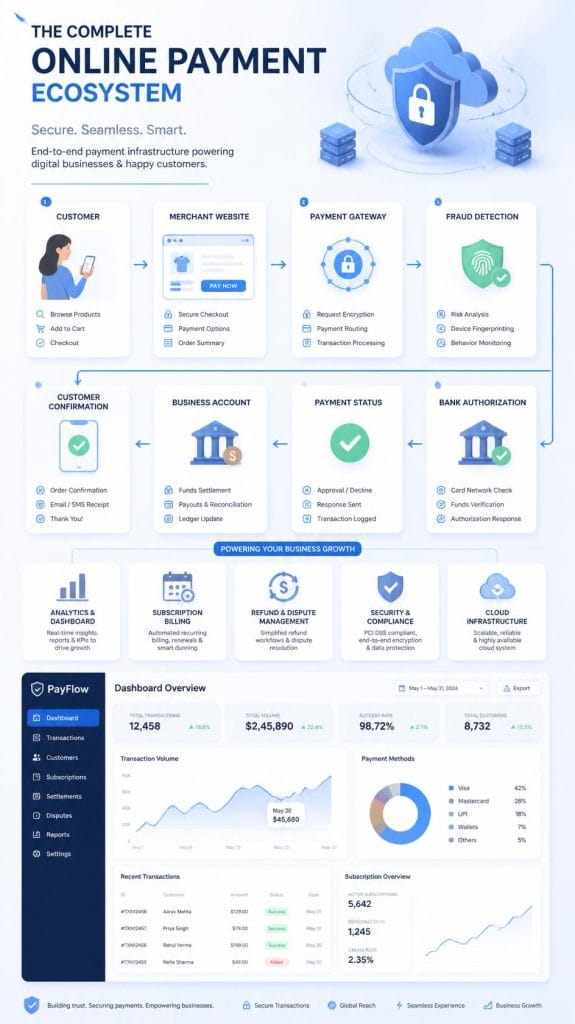
Stripe acts as a payment processor between your business, your customer, and the banking system.
The payment process generally follows these steps:
Step 1 — Customer Initiates Payment
A customer enters payment information on your checkout page.
Step 2 — Payment Encryption
Stripe encrypts the payment information using modern security standards before transmitting it.
Step 3 — Authorization
Stripe communicates with the customer’s card issuer or payment provider to determine whether the payment should be approved.
Step 4 — Fraud Analysis
Before completing the transaction, Stripe performs automated risk analysis using fraud detection systems to help identify suspicious activity.
Step 5 — Payment Confirmation
If the payment is approved, the customer receives confirmation, and the business can proceed with fulfilling the order or service.
Step 6 — Settlement
Funds are transferred to the business account according to Stripe’s payout schedule.
Why Businesses Choose Stripe
Millions of businesses prefer Stripe because it combines flexibility, scalability, and strong security.
Some of the main reasons include:
- Easy integration
- Fast payment processing
- Support for recurring billing
- Developer-friendly APIs
- Multiple payment methods
- Advanced fraud prevention
- Global payment support
- Detailed reporting
- Scalable infrastructure
- Strong documentation
Stripe can grow alongside a business, making it suitable for both small startups and large organizations.
Key Features of Stripe
1. Online Payment Processing
Stripe enables businesses to accept payments from customers in many regions using various payment methods.
2. Subscription Billing
Businesses offering recurring services can automate billing cycles, invoices, and payment collection.
Ideal for:
- SaaS companies
- Membership websites
- Streaming platforms
- Online communities
3. Global Payments
Stripe supports international transactions, allowing businesses to serve customers in multiple countries and currencies.
4. Developer-Friendly APIs
One of Stripe’s biggest strengths is its extensive API ecosystem.
Developers can customize payment flows, automate business operations, and integrate Stripe with websites, mobile apps, and third-party platforms.
5. Fraud Prevention
Stripe includes sophisticated fraud detection tools that help reduce fraudulent transactions while minimizing unnecessary payment declines.
6. Payment Links
Businesses can generate secure payment links without building a complete website, making it easy to accept one-time payments.
7. Invoicing
Stripe allows businesses to create professional invoices and accept online payments directly from those invoices.
8. Analytics and Reporting
Business owners gain access to detailed dashboards showing:
- Revenue
- Refunds
- Failed payments
- Customer activity
- Transaction history
These insights can help improve financial planning and operational decisions.
Supported Payment Methods
Stripe supports numerous payment methods depending on the country and business type.
Examples include:
- Visa
- Mastercard
- American Express
- Apple Pay
- Google Pay
- Bank Transfers
- Local Payment Methods (where available)
The exact options vary by region and may change over time.
Benefits of Stripe
Businesses choose Stripe because it offers several advantages:
Fast Integration
Many website builders, eCommerce platforms, and software solutions include built-in Stripe integrations.
High Security
Stripe is designed with security in mind, helping businesses protect customer payment information.
Scalable Infrastructure
Whether you’re processing a few payments each month or millions of transactions, Stripe is built to scale.
Automation
Many routine payment tasks can be automated, reducing manual work.
Excellent Documentation
Stripe provides extensive documentation and resources that make implementation easier for developers and businesses.
Who Should Use Stripe?
Stripe is suitable for a wide range of businesses, including:
- Online stores
- SaaS companies
- Subscription businesses
- Freelancers
- Digital agencies
- Mobile applications
- Online marketplaces
- Educational platforms
- Nonprofit organizations (where supported)
- Enterprise businesses
Choosing the right payment solution depends on your business model, supported region, and compliance requirements.
Stripe Verification (KYC): Why It Matters

To help maintain a secure payment ecosystem and comply with financial regulations, Stripe requires many businesses to complete an identity and business verification process, commonly known as Know Your Customer (KYC).
Verification helps Stripe confirm that businesses using the platform are legitimate and reduces the risk of fraud, money laundering, and other financial crimes.
The exact information requested depends on factors such as your country, business type, and applicable regulations.
Information Commonly Requested
During verification, Stripe may ask for information such as:
- Legal business name
- Business registration details (where applicable)
- Business address
- Tax information (when required)
- Identity details of the business owner or authorized representative
- Bank account information for payouts
- Business website or online presence
- Description of products or services
Providing accurate, consistent, and up-to-date information can help the verification process go more smoothly.
Why Verification Is Important
Verification is designed to protect both businesses and customers.
Benefits include:
- Improved platform security
- Reduced fraud risk
- Compliance with financial regulations
- Safer payment processing
- Greater trust between businesses and customers
Businesses should promptly respond to any requests for additional information to avoid unnecessary delays.
Supported Countries
Stripe is available in many countries and regions, though availability varies by local regulations.
Some locations support full business accounts, while others may have different features or availability.
Before creating or expanding a business, always check Stripe’s official country availability and requirements to ensure your region is supported and to understand any local restrictions.
Stripe Pricing and Fees
Stripe generally uses a transparent pricing model, but fees can vary depending on the country, payment method, and transaction type.
Examples of services that may have separate pricing include:
- Card payments
- International payments
- Currency conversion
- Instant payouts (where available)
- Invoicing
- Subscription billing
- Additional fraud protection tools
Before estimating your payment costs, review the latest pricing information published by Stripe for your region.
Understanding Payouts
After a payment is successfully processed, funds are not always transferred to your bank account immediately.
Instead, Stripe follows a payout schedule.
The timing depends on several factors, including:
- Your country
- Business type
- Account history
- Banking system
- Risk reviews
Businesses should plan cash flow with these payout timelines in mind.
Stripe Security
Security is one of Stripe’s strongest features.
Because payment information is highly sensitive, Stripe uses multiple layers of protection to safeguard transactions and customer data.
These security measures help businesses reduce risk while maintaining a smooth checkout experience.
Encryption
Stripe encrypts payment information during transmission using industry-standard encryption technologies.
This helps protect sensitive payment data from unauthorized access while it is being transferred.
PCI DSS Compliance
Businesses accepting card payments should understand the importance of the Payment Card Industry Data Security Standard (PCI DSS).
Stripe provides tools and infrastructure that help support PCI compliance, but businesses are still responsible for understanding and meeting the compliance requirements that apply to their own operations.
Fraud Prevention
Stripe includes built-in fraud prevention capabilities that analyze transactions for unusual or potentially risky activity.
These automated systems help businesses identify suspicious payments while reducing unnecessary declines for legitimate customers.
Two-Factor Authentication
To improve account security, enable Two-Factor Authentication (2FA) for everyone who has access to your Stripe Dashboard.
This adds an additional layer of protection beyond a password.
Team Access Management
If multiple employees or contractors use the Stripe Dashboard, provide each person with their own account and assign only the permissions they need.
Avoid sharing login credentials.
Best Security Practices
Every business using Stripe should follow these security recommendations:
- Use strong, unique passwords.
- Enable Two-Factor Authentication.
- Review account activity regularly.
- Limit dashboard access to authorized users.
- Keep business information up to date.
- Monitor disputes and refunds promptly.
- Respond quickly to verification requests.
- Train staff on payment security awareness.
Good security practices reduce operational risk and help protect customer trust.
What Is Stripe Atlas?
Stripe Atlas is a service designed to help entrepreneurs establish a business entity in supported jurisdictions and access tools that can assist with launching an online business.
Depending on eligibility and availability, Stripe Atlas may help with tasks such as:
- Company formation
- Tax documentation guidance
- Business banking introductions
- Access to startup resources
- Founder support materials
Because availability, eligibility requirements, and included services may change over time, businesses should review the latest official information before applying.
Common Verification Challenges
Some businesses experience delays during verification.
Common reasons include:
- Incomplete information
- Mismatched business details
- Expired identification documents
- Additional regulatory review
- Missing supporting documentation
If Stripe requests more information, respond accurately and as soon as possible to help avoid extended review times.
Tips for a Smooth Verification Process
Follow these best practices before submitting your information:
- Ensure your business details are accurate and consistent.
- Use valid, current identification documents where required.
- Keep your website updated with clear information about your products or services.
- Provide truthful descriptions of your business activities.
- Monitor your email for any follow-up requests from Stripe.
Preparing your information in advance can help reduce delays and improve the overall verification experience.
Understanding the Stripe Dashboard

The Stripe Dashboard is the central control panel where businesses can manage payments, customers, invoices, subscriptions, reports, refunds, disputes, and account settings from one place. Whether you’re running a small online store or a rapidly growing SaaS platform, the dashboard provides the tools needed to monitor and manage your payment operations efficiently.
One of Stripe’s greatest strengths is its clean and intuitive interface. Business owners can quickly review transactions, identify failed payments, issue refunds, monitor payout schedules, and analyze revenue trends without requiring advanced technical knowledge.
Key Sections of the Stripe Dashboard
Payments
This section displays all payment activity, including successful, pending, failed, and refunded transactions. You can filter transactions by date, payment method, customer, or amount, making it easier to locate specific records.
Customers
The Customers section stores information about individuals or businesses that have made payments through your Stripe integration. Depending on your integration and applicable privacy laws, it may include billing details, payment history, subscriptions, and saved payment methods.
Products & Pricing
Businesses can create products, define prices, manage recurring plans, and organize subscription offerings. This is particularly useful for SaaS companies, membership websites, and digital service providers.
Invoices
Stripe allows businesses to generate professional invoices, track payment status, send reminders, and manage outstanding balances from a single interface.
Subscriptions
Recurring billing is one of Stripe’s most popular features. The dashboard allows businesses to monitor active subscriptions, cancellations, renewals, free trials, and recurring revenue.
Reporting & Analytics
Stripe provides detailed reports covering:
- Gross revenue
- Net revenue
- Successful payments
- Failed transactions
- Refund volume
- Dispute activity
- Customer growth
- Payout history
These insights help businesses make informed financial and operational decisions.
Developers
For businesses using custom integrations, the Developers section provides API keys, webhooks, logs, and testing tools. Developers can monitor API requests, troubleshoot issues, and safely test payment workflows before deploying changes.
Payment Methods Supported by Stripe
One of Stripe’s biggest advantages is its support for a wide variety of payment methods. The exact options available depend on your country, business type, customer location, and Stripe’s current regional support.
Card Payments
Stripe supports many major credit and debit card networks, allowing businesses to accept payments from customers around the world.
Commonly supported card networks include:
- Visa
- Mastercard
- American Express
- Discover (in supported regions)
Card payments remain one of the most widely used payment methods for online businesses.
Digital Wallets
Many customers prefer paying with digital wallets because they offer convenience and an additional layer of security.
Depending on region and device compatibility, Stripe may support options such as:
- Apple Pay
- Google Pay
These payment methods often improve checkout speed, particularly on mobile devices.
Bank Transfers
In supported markets, businesses may also accept bank transfers for certain transaction types. Availability and supported banking methods vary by country.
Buy Now, Pay Later (BNPL)
Stripe supports selected Buy Now, Pay Later payment options in eligible markets. These services allow customers to split purchases into installments while businesses receive payment according to the provider’s terms.
Availability depends on location, eligibility, and supported payment providers.
Local Payment Methods
Different countries often have preferred local payment methods. Stripe supports a range of regional payment options where available, helping businesses provide a more localized checkout experience for international customers.
Choosing the Right Payment Methods
Offering the right payment options can improve customer experience and reduce checkout abandonment.
When deciding which payment methods to enable, consider factors such as:
- Customer location
- Device usage
- Average order value
- Business model
- Supported currencies
- Regional preferences
Businesses serving international customers should regularly review which payment methods are most commonly used in their target markets.
Understanding Refunds
A refund occurs when a business returns money to a customer after a completed payment.
Refunds are a normal part of online commerce and may occur for several reasons, including:
- Customer cancellations
- Duplicate payments
- Product returns
- Service issues
- Billing errors
Providing a transparent refund policy can help improve customer trust and reduce unnecessary disputes.
How Refunds Work
While specific workflows may vary depending on your integration, refunds are generally managed through the Stripe Dashboard or API.
After a refund is initiated:
- Stripe processes the refund request.
- The payment provider receives the request.
- The customer’s bank or card issuer processes the returned funds.
- The customer receives the refund according to their financial institution’s processing time.
Refund processing times vary depending on the payment method and banking system.
Best Practices for Refund Management
Businesses should follow several best practices when handling refunds:
- Publish a clear refund policy.
- Respond to customer requests promptly.
- Keep detailed transaction records.
- Communicate expected refund timelines.
- Review refund trends to identify recurring issues.
A smooth refund experience often leads to greater customer satisfaction and long-term trust.
Understanding Chargebacks
A chargeback occurs when a cardholder asks their bank or card issuer to reverse a payment rather than requesting a refund directly from the business.
Chargebacks are designed to protect consumers from unauthorized or problematic transactions. However, they can also increase operational costs and require businesses to provide supporting evidence during the review process.
Common reasons for chargebacks include:
- Unauthorized transactions
- Product not received
- Product significantly different from its description
- Duplicate charges
- Subscription misunderstandings
- Fraudulent card use
Chargebacks should not be confused with standard refunds. A refund is initiated by the business, while a chargeback is initiated by the cardholder through their financial institution.
How Businesses Can Reduce Chargebacks
Although chargebacks cannot always be avoided, businesses can reduce their frequency by following best practices:
Use Clear Product Descriptions
Provide accurate descriptions, pricing, images, and delivery expectations.
Display Transparent Policies
Customers should easily find your refund, cancellation, shipping, and support policies before making a purchase.
Communicate with Customers
Respond quickly to support inquiries before small issues become payment disputes.
Use Order Confirmation Emails
Confirmation emails provide customers with proof of purchase and important transaction details.
Monitor Fraud Signals
Review unusual purchasing behavior and monitor risk indicators using available fraud prevention tools.
Maintain Accurate Business Information
Ensure that your business name, contact information, and billing descriptors are recognizable to customers.
Understanding Payment Disputes
A payment dispute occurs when a customer questions a transaction and requests that it be reviewed.
Not every dispute results in a chargeback. Some issues are resolved through communication between the business and customer before escalating further.
When a dispute occurs, businesses may be asked to provide evidence supporting the legitimacy of the transaction.
Examples of supporting information may include:
- Order confirmations
- Delivery records
- Customer communication
- Invoice copies
- Subscription agreements
- Refund history
Maintaining organized records can make it easier to respond if a dispute arises.
Tips for Preventing Payment Disputes
Reducing disputes begins long before a payment is processed.
Businesses should consider the following best practices:
- Clearly explain products and services.
- Make pricing easy to understand.
- Display billing terms prominently.
- Send purchase confirmations immediately.
- Offer responsive customer support.
- Notify customers before recurring charges, where appropriate.
- Keep transaction records organized.
- Review customer complaints for recurring issues.
A proactive customer experience often reduces misunderstandings and helps build long-term trust.
Expert Insight
Many payment issues are not caused by technical problems—they stem from poor communication, unclear expectations, or inconsistent customer support. Businesses that invest in transparent policies, accurate product information, and timely communication typically experience fewer disputes and stronger customer satisfaction over time.
Stripe vs PayPal vs Square: Which Payment Platform Is Right for Your Business?
Choosing the right payment platform is one of the most important decisions for any online business. While Stripe, PayPal, and Square are among the industry’s most recognized payment solutions, each platform is designed with different business needs in mind.
There is no universal “best” option. The ideal choice depends on your business model, customer base, technical requirements, preferred payment methods, and long-term growth plans.
The comparison below highlights the key differences.
| Feature | Stripe | PayPal | Square |
| Best For | Online Businesses, SaaS, Marketplaces | Small Businesses, Freelancers, International Sellers | Retail Stores, Restaurants, POS Businesses |
| Payment Processing | ✔ Excellent | ✔ Excellent | ✔ Excellent |
| Subscription Billing | ✔ Advanced | ✔ Available | ✔ Available |
| Developer APIs | ⭐ Excellent | Good | Good |
| Checkout Customization | Excellent | Moderate | Moderate |
| Invoicing | ✔ Yes | ✔ Yes | ✔ Yes |
| Recurring Payments | ✔ Advanced | ✔ Available | ✔ Available |
| Marketplace Support | ✔ Strong | Limited | Limited |
| Point-of-Sale (POS) | Limited | Limited | ⭐ Excellent |
| International Business Support | Strong | Strong | Varies by Region |
| Fraud Protection Tools | Advanced | Good | Good |
| Business Scalability | Excellent | Good | Good |
| Ease of Setup | Moderate | Very Easy | Very Easy |
When Should You Choose Stripe?
Stripe is particularly well-suited for businesses that require flexibility, automation, and scalability.
Stripe may be a strong choice if your business:
- Operates an e-commerce website.
- Offers subscription-based services.
- Runs a SaaS platform.
- Needs recurring billing.
- Accepts international payments.
- Requires API integrations.
- Plans to scale over time.
Its extensive developer tools and customizable payment workflows make it especially popular with technology-driven businesses.
When PayPal May Be a Better Fit
PayPal is widely recognized by consumers and can be an attractive option for businesses looking for a familiar and easy-to-use checkout experience.
It may be suitable for:
- Freelancers
- Consultants
- Small online stores
- Digital service providers
- Businesses seeking a simple setup process
Many customers already have PayPal accounts, which can help streamline checkout for returning users.
When Square Is a Strong Option
Square is often preferred by businesses that combine online sales with in-person transactions.
Examples include:
- Retail shops
- Restaurants
- Cafés
- Beauty salons
- Local service businesses
- Pop-up stores
Its integrated hardware and point-of-sale ecosystem make it a practical solution for physical businesses.
Expert Recommendation
Rather than asking which platform is “best,” consider which platform best matches your business goals.
- Choose Stripe if you prioritize flexibility, automation, subscriptions, and custom integrations.
- Choose PayPal if ease of use and broad customer recognition are your primary concerns.
- Choose Square if your business relies heavily on in-person sales and point-of-sale operations.
Many growing businesses also use more than one payment solution to provide customers with additional payment choices and improve checkout flexibility.
Key Takeaways
Stripe, PayPal, and Square each offer powerful payment capabilities, but they serve different business needs. Stripe stands out for its flexibility, developer-friendly tools, recurring billing, and scalability, making it a strong option for growing online businesses.
Regardless of the platform you choose, long-term success depends on delivering a secure payment experience, maintaining transparent business policies, monitoring payment performance, and putting customer trust at the center of every transaction.
Best Practices for eCommerce Businesses Using Stripe
A smooth payment experience directly influences conversion rates, customer satisfaction, and repeat purchases. Businesses using Stripe for eCommerce should focus on creating a fast, secure, and transparent checkout process.
1. Simplify the Checkout Experience
Lengthy checkout forms often lead to abandoned carts.
Keep your checkout process as simple as possible by:
- Minimizing unnecessary form fields.
- Supporting guest checkout where appropriate.
- Reducing the number of checkout steps.
- Optimizing the experience for mobile devices.
A faster checkout generally leads to higher conversion rates.
2. Offer Multiple Payment Methods
Different customers prefer different payment methods.
Where available, consider enabling:
- Major credit and debit cards
- Digital wallets
- Regional payment methods
Offering familiar payment options can improve customer confidence and increase successful transactions.
3. Display Clear Pricing
Unexpected charges are one of the most common reasons customers abandon purchases.
Always display:
- Product price
- Taxes (where applicable)
- Shipping costs
- Subscription terms
- Renewal information (if applicable)
Transparency helps reduce customer confusion and payment disputes.
4. Publish Clear Business Policies
Customers should easily find your:
- Refund Policy
- Shipping Policy
- Privacy Policy
- Terms of Service
- Contact Information
Clearly written policies help build trust and improve the overall customer experience.
5. Monitor Payment Performance
Review payment analytics regularly to identify opportunities for improvement.
Pay attention to:
- Failed payment rates
- Successful transaction trends
- Refund volume
- Customer purchasing behavior
- Payment method performance
These insights can help optimize your checkout process over time.
eCommerce Pro Tips
✔ Optimize your checkout page for mobile users.
✔ Use high-quality product descriptions and images.
✔ Send confirmation emails immediately after purchase.
✔ Provide shipment or service updates promptly.
✔ Respond quickly to customer support requests.
A positive purchasing experience often leads to higher customer retention and repeat business. Buy Verified Google Ads Accounts
Stripe Best Practices for SaaS Companies
Subscription businesses have unique payment requirements. Stripe offers features that can help SaaS companies manage recurring billing and customer subscriptions more efficiently.
1. Automate Subscription Billing
Recurring billing automation reduces manual work and helps maintain a consistent payment cycle.
Businesses should clearly communicate:
- Billing frequency
- Renewal dates
- Trial periods
- Upgrade and downgrade options
Clear communication reduces confusion and improves customer satisfaction.
2. Provide Transparent Pricing
Potential customers should understand exactly what is included in each pricing plan.
Include information such as:
- Monthly or annual pricing
- Included features
- User limits
- Storage limits
- Additional usage fees (if any)
Simple pricing improves trust and helps customers make informed decisions.
3. Notify Customers Before Renewals
Sending reminder emails before subscription renewals helps reduce unexpected charges and minimizes billing-related complaints.
These reminders also give customers an opportunity to update payment methods or modify their plans.
4. Monitor Failed Payments
Failed recurring payments can increase customer churn.
Businesses should regularly monitor:
- Expired cards
- Payment failures
- Retry attempts
- Subscription cancellations
Addressing payment issues promptly can improve revenue retention.
5. Analyze Subscription Metrics
Successful SaaS companies monitor performance metrics such as:
- Monthly Recurring Revenue (MRR)
- Customer Lifetime Value (LTV)
- Customer Churn Rate
- Active Subscribers
- Renewal Rate
These metrics provide valuable insights into long-term business growth.
SaaS Pro Tips
✔ Keep onboarding simple.
✔ Offer clear cancellation options.
✔ Make invoices easy to understand.
✔ Maintain responsive customer support.
✔ Regularly review subscription performance.
A smooth subscription experience encourages customer loyalty and sustainable growth.
Best Practices for Freelancers
Freelancers depend on timely payments and professional client relationships. Stripe can support a streamlined payment workflow when combined with good business practices.
1. Use Professional Invoices
Invoices should include:
- Business name
- Client information
- Service description
- Payment amount
- Due date
- Contact details
Well-structured invoices help reduce payment delays and improve professionalism.
2. Define Payment Terms Upfront
Before starting a project, clearly communicate:
- Project scope
- Payment schedule
- Deposit requirements
- Revision policy
- Refund terms (if applicable)
Written agreements help prevent misunderstandings.
3. Keep Accurate Records
Maintain organized records of:
- Invoices
- Payments received
- Client communications
- Contracts
- Expense documentation
Good record-keeping simplifies financial management and tax preparation.
4. Build Client Trust
Professional communication plays a significant role in long-term client relationships.
Respond promptly, provide regular project updates, and address client questions clearly and respectfully.
Satisfied clients are more likely to return for future projects and recommend your services.
5. Prioritize Account Security
Freelancers often manage sensitive client information.
To protect your business:
- Enable Two-Factor Authentication (2FA).
- Use strong, unique passwords.
- Monitor account activity regularly.
- Keep software and devices updated.
Security is essential for maintaining client confidence.
Top 15 Common Mistakes Businesses Should Avoid When Using Stripe
Using Stripe effectively involves more than simply accepting payments. Many payment-related issues arise from operational practices, unclear communication, or poor account management rather than technical problems. Avoiding the following common mistakes can help improve customer satisfaction, reduce disputes, and support long-term business growth.
1. Providing Inaccurate Business Information
Always ensure that your business name, contact information, website details, and other account information are accurate and up to date. Inconsistent information may lead to delays in verification or additional review requests.
2. Ignoring Security Best Practices
Strong passwords, Two-Factor Authentication (2FA), limited account access, and regular security reviews are essential. Good security practices help protect both your business and your customers.
3. Using Unclear Product Descriptions
Customers should immediately understand what they are purchasing. Clear descriptions, pricing, delivery expectations, and service terms help reduce confusion and complaints.
4. Hiding Refund Policies
A visible, easy-to-understand refund policy builds customer confidence and can reduce payment disputes. Make sure your policy is available before checkout.
5. Delayed Customer Support
Slow responses often turn small issues into refunds or disputes. Responding promptly to customer questions demonstrates professionalism and improves trust.
6. Ignoring Failed Payments
Review failed payment reports regularly. Addressing issues such as expired cards or payment method errors quickly can help recover revenue and reduce customer churn.
7. Offering Too Few Payment Methods
Customers have different payment preferences. Supporting appropriate payment options for your market can improve checkout completion rates.
8. Poor Mobile Checkout Experience
Many customers complete purchases on mobile devices. A slow or complicated mobile checkout process may increase cart abandonment.
9. Failing to Monitor Analytics
Regularly reviewing payment trends, refunds, disputes, and customer behavior helps identify opportunities for operational improvement.
10. Not Sending Purchase Confirmations
Order confirmation emails reassure customers that their payment was successful and provide useful transaction details.
11. Poor Subscription Communication
For recurring billing, clearly explain billing frequency, renewal dates, cancellation procedures, and pricing before customers subscribe.
12. Weak Internal Access Controls
If multiple team members use Stripe, assign individual accounts with appropriate permissions instead of sharing login credentials.
13. Ignoring Compliance Responsibilities
Businesses remain responsible for understanding and complying with applicable financial, tax, privacy, and consumer protection laws in the jurisdictions where they operate.
14. Neglecting Regular Account Reviews
Review account settings, payout schedules, connected integrations, and business information periodically to ensure everything remains accurate.
15. Prioritizing Short-Term Convenience Over Customer Trust
Long-term business success depends on transparency, security, reliable customer service, and consistent communication. Building customer trust should always be a priority.
Businesses that consistently succeed with online payments usually focus on operational excellence rather than looking for shortcuts. The following practices reflect widely accepted payment management principles.
Keep Your Business Information Current
Update your business details whenever your company name, address, ownership structure, website, or contact information changes. Accurate information helps maintain smooth account operations.
Invest in Customer Support
Responsive support is one of the most effective ways to prevent disputes. Clear communication before and after payment helps customers feel confident about their purchases.
Monitor Payment Performance
Review key metrics regularly, including:
- Successful payment rate
- Failed payment rate
- Refund volume
- Dispute frequency
- Average transaction value
- Customer retention
Monitoring trends over time helps identify areas for improvement.
Educate Your Team
Everyone who has access to payment systems should understand security best practices, customer service expectations, and internal procedures. Well-trained staff contribute to a safer and more efficient payment operation.
Build for Long-Term Growth
When selecting payment tools and workflows, consider future expansion. A scalable payment strategy can support new products, international customers, and evolving business needs without requiring major operational changes.
2026 Stripe Best Practices Checklist
Use this checklist to review your payment operations regularly.
Account Management
☐ Business information is accurate and current.
☐ Team members have appropriate access permissions.
☐ Two-Factor Authentication is enabled for all users.
☐ Strong, unique passwords are used.
Customer Experience
☐ Product and service descriptions are clear.
☐ Pricing is transparent.
☐ Refund policy is easy to find.
☐ Contact information is prominently displayed.
☐ Order confirmation emails are sent promptly.
Payment Operations
☐ Payment performance is reviewed regularly.
☐ Failed payments are investigated.
☐ Refund requests are handled efficiently.
☐ Customer inquiries receive timely responses.
Security
☐ Account activity is monitored routinely.
☐ Sensitive information is protected.
☐ Software and integrations are kept up to date.
☐ Team members receive security awareness training.
Business Growth
☐ Customer feedback is reviewed regularly.
☐ Payment methods are evaluated based on customer preferences.
☐ Business processes are updated as the company grows.
☐ Performance reports support informed decision-making.
Complete Guide to Stripe Pro Tips
Pro Tip #1
Treat your payment experience as part of your customer experience. A smooth checkout process can increase customer confidence and improve conversion rates.
Pro Tip #2
Review payment reports every week rather than waiting for monthly summaries. Small issues are often easier to resolve before they become larger operational problems.
Pro Tip #3
Communicate proactively with customers. Clear expectations about pricing, delivery, subscriptions, and refunds help prevent misunderstandings.
Pro Tip #4
Keep your website professional and up to date. Accurate business information, helpful content, and clear policies reinforce customer trust.
Pro Tip #5
Regularly evaluate whether your payment setup still matches your business goals. As your company grows, your payment requirements may evolve.
Quick Summary Table
| Topic | Key Recommendation |
| Business Information | Keep all account details accurate and updated. |
| Security | Enable 2FA, use strong passwords, and monitor account activity. |
| Customer Communication | Provide clear pricing, policies, and timely support. |
| Refund Management | Maintain a transparent refund process and respond quickly to requests. |
| Dispute Prevention | Use accurate product descriptions and maintain organized transaction records. |
| Payment Methods | Offer payment options that align with customer preferences and supported regions. |
| Reporting | Review payment analytics, refunds, and disputes regularly. |
| Team Management | Assign individual user accounts with appropriate permissions. |
| Compliance | Stay informed about applicable legal, financial, and privacy requirements. |
| Business Growth | Continuously improve your payment experience based on customer feedback and performance data. |
Stripe provides businesses with a powerful and flexible payment platform, but long-term success depends on more than technology alone. Accurate business information, strong security practices, transparent customer communication, and ongoing performance monitoring are all essential for building a reliable payment operation.
Businesses that prioritize trust, operational excellence, and continuous improvement are better positioned to create positive customer experiences and support sustainable growth in an increasingly competitive digital marketplace.
| Pros | Cons |
| Easy Integration | Learning Curve for Beginners |
| Excellent API | Not Available Everywhere |
| Strong Security | Features Vary by Region |
| Subscription Billing | Some Advanced Features Require Technical Setup |
Frequently Asked Questions (FAQs)
1. What is Stripe?
Stripe is a technology company that provides online payment processing solutions for businesses. It enables companies to accept payments, manage subscriptions, send invoices, and automate financial operations through a secure and scalable platform.
2. How does Stripe work?
Stripe securely processes online payments by connecting customers, businesses, banks, and payment networks. It authorizes transactions, helps detect fraud, and transfers eligible funds to the business according to its payout schedule.
3. Is Stripe safe to use?
Yes. Stripe uses industry-standard encryption, supports PCI DSS compliance, and offers advanced fraud prevention tools to help businesses protect payment information and reduce fraudulent activity.
4. Who can use Stripe?
Stripe is designed for a wide range of users, including:
- eCommerce businesses
- SaaS companies
- Freelancers
- Digital agencies
- Online marketplaces
- Subscription-based businesses
- Startups and enterprises
Availability depends on the country where the business operates.
5. What payment methods does Stripe support?
Depending on the region, Stripe can support:
- Credit and debit cards
- Digital wallets (such as Apple Pay and Google Pay)
- Bank transfers
- Local payment methods
- Selected Buy Now, Pay Later (BNPL) options
Available payment methods vary by country.
6. Does Stripe support recurring payments?
Yes. Stripe provides tools for recurring billing and subscription management, making it suitable for SaaS businesses, memberships, and subscription-based services.
7. What is Stripe Verification (KYC)?
Stripe Verification is a process that helps confirm the identity of businesses using the platform. It supports regulatory compliance and helps maintain a secure payment ecosystem.
8. Why is Stripe asking for business documents?
Stripe may request business or identity documents to verify account information, comply with financial regulations, and protect against fraud. The specific requirements depend on factors such as your business type and region.
9. How long does Stripe verification take?
Verification time varies depending on the information submitted and whether additional review is required. Providing complete and accurate documentation can help avoid unnecessary delays.
10. What is the Stripe Dashboard?
The Stripe Dashboard is a web-based control panel where businesses can manage payments, customers, subscriptions, invoices, refunds, reports, and account settings.
11. What is the difference between a refund and a chargeback?
A refund is initiated by the business and returns money directly to the customer.
A chargeback is initiated by the customer through their bank or card issuer, usually when a transaction is questioned or disputed.
12. How can businesses reduce chargebacks?
Businesses can reduce chargebacks by:
- Providing clear product descriptions
- Publishing transparent refund policies
- Communicating with customers promptly
- Keeping accurate transaction records
- Monitoring for suspicious payment activity
13. What is Stripe Atlas?
Stripe Atlas is a service designed to help eligible entrepreneurs establish a business entity and access resources that support launching and managing an online business. Availability varies by region.
14. Does Stripe support international payments?
Yes. Stripe supports international payments and multiple currencies in many supported regions. Available features depend on local regulations and account eligibility.
15. What industries commonly use Stripe?
Stripe is commonly used by:
- Online stores
- Software companies
- Digital service providers
- Educational platforms
- Marketplaces
- Nonprofit organizations (where supported)
- Subscription businesses
16. How can I improve payment security with Stripe?
Businesses should:
- Enable Two-Factor Authentication (2FA)
- Use strong passwords
- Limit account access
- Monitor account activity regularly
- Keep business information up to date
- Follow applicable security and compliance requirements
17. Is Stripe suitable for small businesses?
Yes. Many startups and small businesses choose Stripe because it offers flexible payment tools that can scale as the business grows. The right payment solution depends on each business’s needs and region.
18. What are the best practices for using Stripe?
Some recommended best practices include:
- Keep business information accurate
- Communicate clearly with customers
- Review payment reports regularly
- Respond quickly to customer inquiries
- Follow security best practices
- Maintain transparent pricing and policies
19. Can Stripe integrate with websites and applications?
Yes. Stripe offers APIs and integrations that allow businesses to connect it with websites, mobile apps, eCommerce platforms, and custom software.
20. Is Stripe the right payment platform for every business?
Not necessarily. The best payment platform depends on factors such as your business model, customer location, payment requirements, technical needs, and supported region. Comparing available solutions before making a decision is a good practice.
Conclusion

Stripe has established itself as one of the leading online payment platforms by combining flexibility, security, and scalability into a single solution. From startups and freelancers to SaaS companies and enterprise organizations, businesses choose Stripe because it supports modern payment experiences while offering powerful tools for automation, recurring billing, and business growth. So you can buy Verified Stripe Accounts Secure & Ready-to-Use from AcctroBoost
However, technology alone does not guarantee success. A secure payment environment depends on accurate business information, transparent customer communication, responsible account management, and continuous attention to security and compliance.
By understanding how Stripe works, following industry best practices, and regularly reviewing your payment operations, businesses can create a smoother customer experience, reduce operational risks, and build long-term trust.
As payment technology continues to evolve, staying informed about platform updates, security recommendations, and regulatory requirements will help businesses remain competitive in the rapidly changing digital economy.
Whether you are launching your first online store or scaling an international business, a well-managed payment strategy can become a valuable foundation for sustainable growth.
Ready to Learn More About Modern Payment Solutions?
Understanding how Stripe works is the first step toward building a secure and efficient online payment strategy. Continue exploring our educational resources to learn about payment security, business verification, subscription billing, and digital payment technologies.
If you’re looking for more in-depth guides, comparisons, and best practices, visit our Payment Solutions section to discover expert insights designed for online businesses, startups, agencies, and entrepreneurs.
Stay informed, follow industry best practices, and build your business on a foundation of security, transparency, and customer trust.